Connect your sources.
Every guide below follows the provider's own screens word for word. Paste read-only keys, nothing more. Each guide says how long it takes, from two minutes for AdMob to fifteen for Google Play.
How connecting works
INTARC reads from the places your money already flows through. Two kinds of thing get connected, and they behave differently.
Apps are created from their revenue source. One RevenueCat project is one app, with its iOS and Android builds inside. Without RevenueCat, an app is App Store Connect plus Google Play. Every app needs its own key, because RevenueCat keys are scoped to one project.
Ad accounts are connected once for the whole studio. A Meta or TikTok account usually pays for several apps, so INTARC reads every campaign in every ad account the token can see and routes each one to the app it promotes: by the store listing Meta reports, then by the app's name in the campaign name, with a manual override under Sources. Sources shows which ad accounts the token reaches and warns when an app has no campaigns in any of them.
| Source | What it gives | Needed |
|---|---|---|
| RevenueCat | Revenue, trials, conversions, active subscribers, both stores in one key | one of these |
| App Store Connect | Downloads and Apple proceeds from your sales reports | one of these |
| Google Play | Installs and Google proceeds from Play Console reports | one of these |
| AdMob | What the ads inside your apps earn, per app and day | optional |
| Meta Ads | Spend, impressions, clicks, app installs by campaign and day | optional |
| TikTok Ads | Spend, impressions, clicks, app installs by campaign and day. In review: see TikTok Ads below | optional |
| Apple Search Ads | Spend, taps and installs by campaign, country and day | optional |
Keys are checked against the provider the moment you paste them. If a key is wrong, nothing is saved. If it is right, the last 180 days are pulled first, so the dashboard is ready in minutes, and older history follows in the background, as far back as the source keeps it, up to three years (App Store Connect keeps one year of daily sales). After that, revenue from RevenueCat refreshes every 10 minutes, ad accounts every 30 minutes, and everything else every six hours. Keys are encrypted at rest and never shown again.
Selling on both stores? RevenueCat already covers both. If you connect the stores directly, connect both App Store Connect and Google Play, or you will be looking at half your revenue.
RevenueCat
One project is one product, with its iOS and Android apps inside. One secret key reaches one project, and INTARC reads the project from the key. Four screens, one value to paste, nothing else to copy.
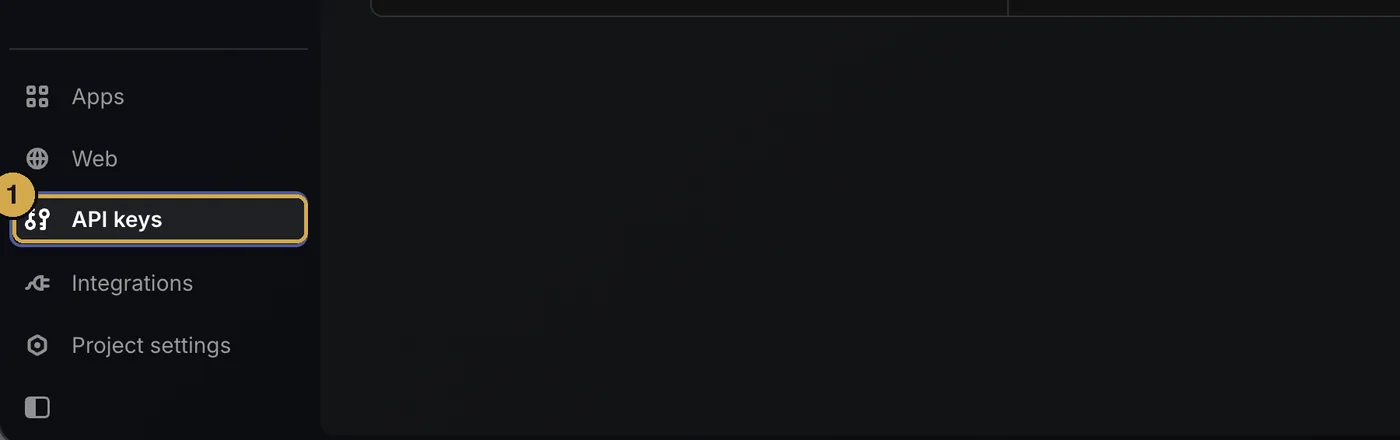
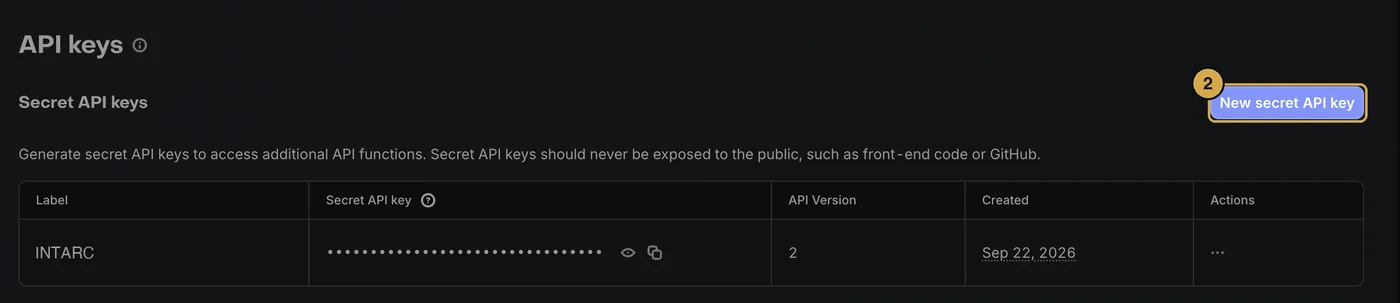
INTARC. 4Leave API version on V2.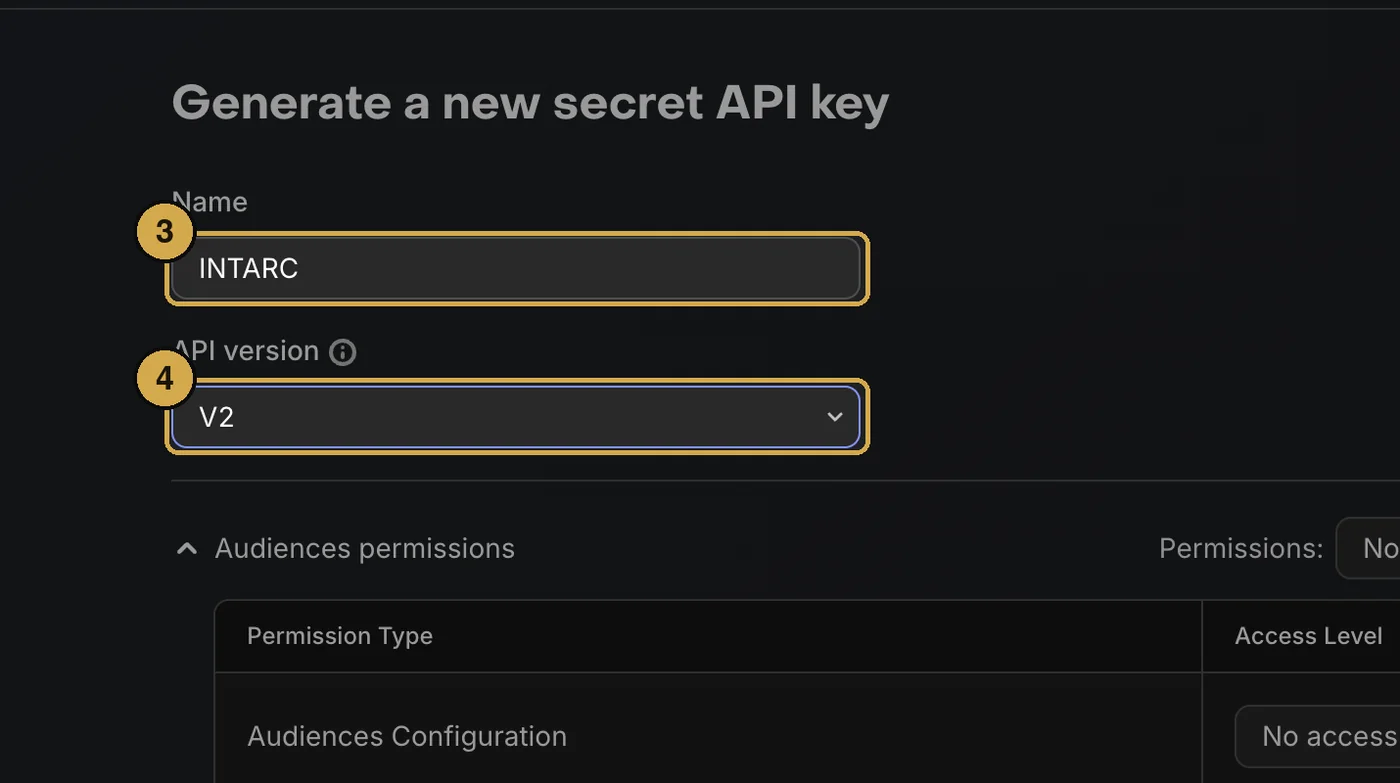
sk_.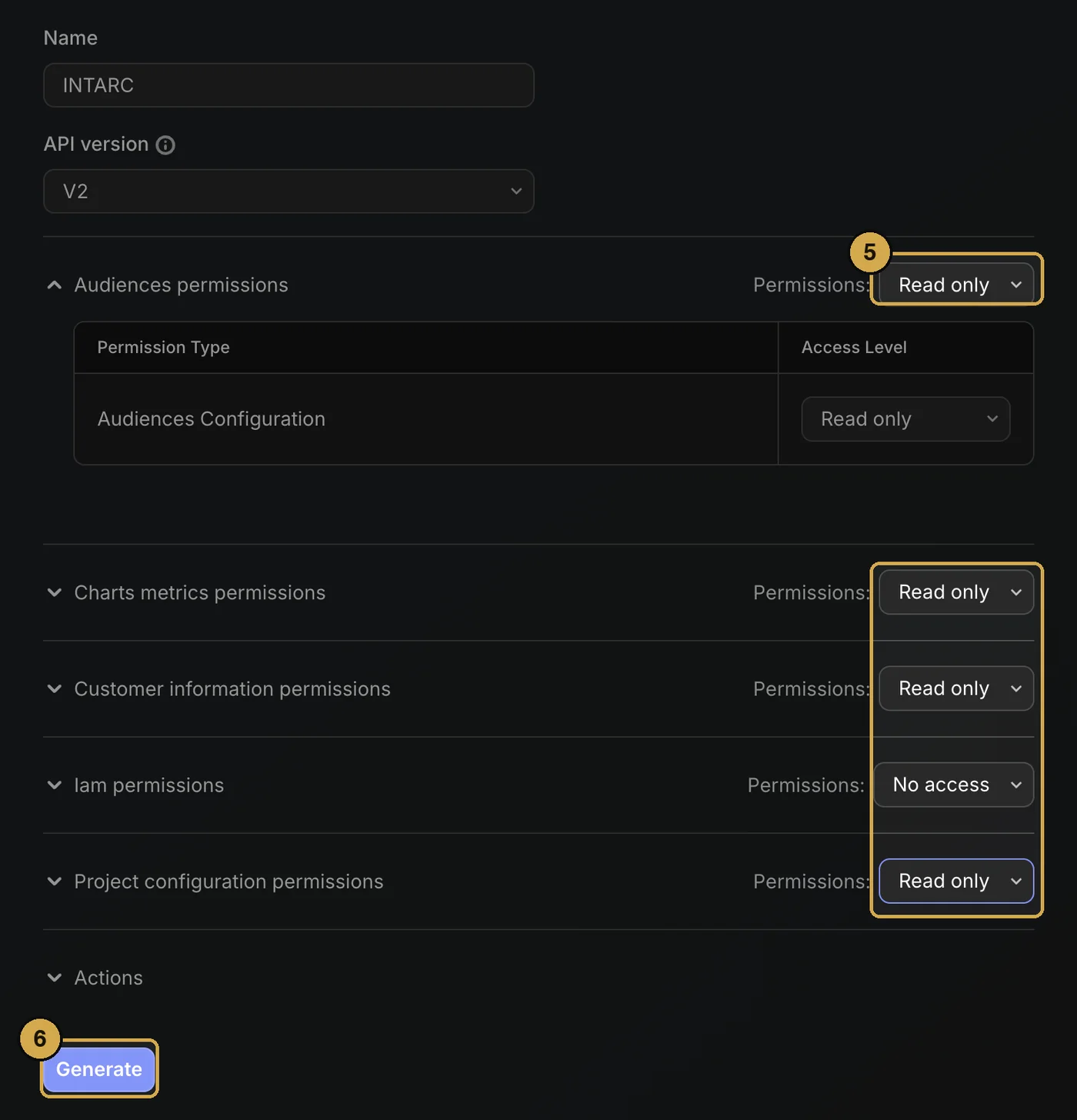
Several products? After the first project connects, click Add another project in the confirmation line and repeat with the next key. Each project becomes its own app. In the rare case a single key reaches several projects, INTARC lists them and you pick one; there is no ID to copy.
What each permission is for
| Group | Used for | Access |
|---|---|---|
| Charts metrics | Daily revenue, trials, conversions, actives, MRR; per install day, revenue by day since install and subscriptions still set to renew or still active by plan length; revenue by kind of transaction; RevenueCat's own revenue predictions | read only |
| Customer information | Cohort payback by first-seen date, refunds, store split | read only |
| Audiences | Your audience definitions, so cohorts match the ones you use | read only |
| Project configuration | Project name, apps and products, for labels | read only |
| Iam, Actions | Not used. Never grant these. | no access |
Ads inside your app
If your app shows ads, RevenueCat can report what they earn next to your purchases, through its ad monetization feature (AdMob, for example). INTARC reads it with the same key, nothing to set up. That money counts in your revenue and pays no store fee, the store's cut is taken from purchases only, and a campaign is never cut on purchases alone when its users also earn you money by watching ads.
Using AdMob? Turn on Impression-level ad revenue in AdMob's settings, or RevenueCat receives no ad revenue. RevenueCat's figures arrive from the app as ads are shown, so they differ a little from the AdMob dashboard, which adjusts its numbers over the next day or two. Ad revenue counts from the day you set it up: earlier days show none, and INTARC points that out wherever a comparison crosses that day.
App Store Connect
Use this if you do not run RevenueCat, or if you want Apple's own download and proceeds figures next to it. It reads the daily sales reports of your vendor account and keeps each app's figures with that app. One key covers every app in the account.
Create the key
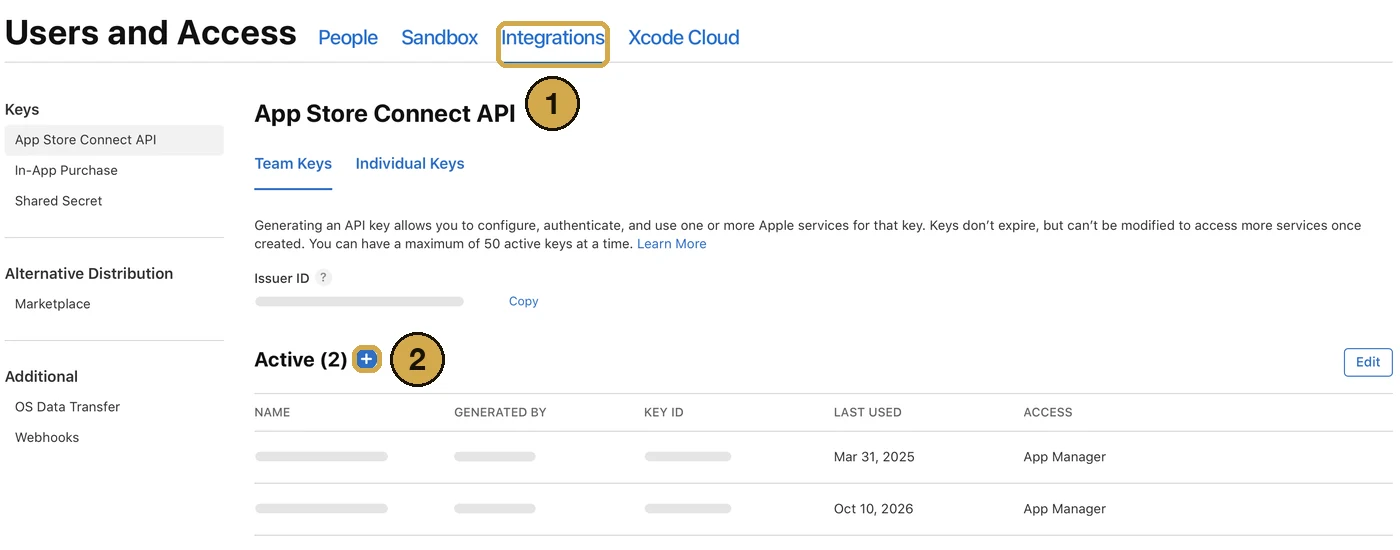
INTARC. 4Open Access and choose Sales and Reports, nothing else. It covers Sales and Trends and Payments and Financial Reports, which is all INTARC reads.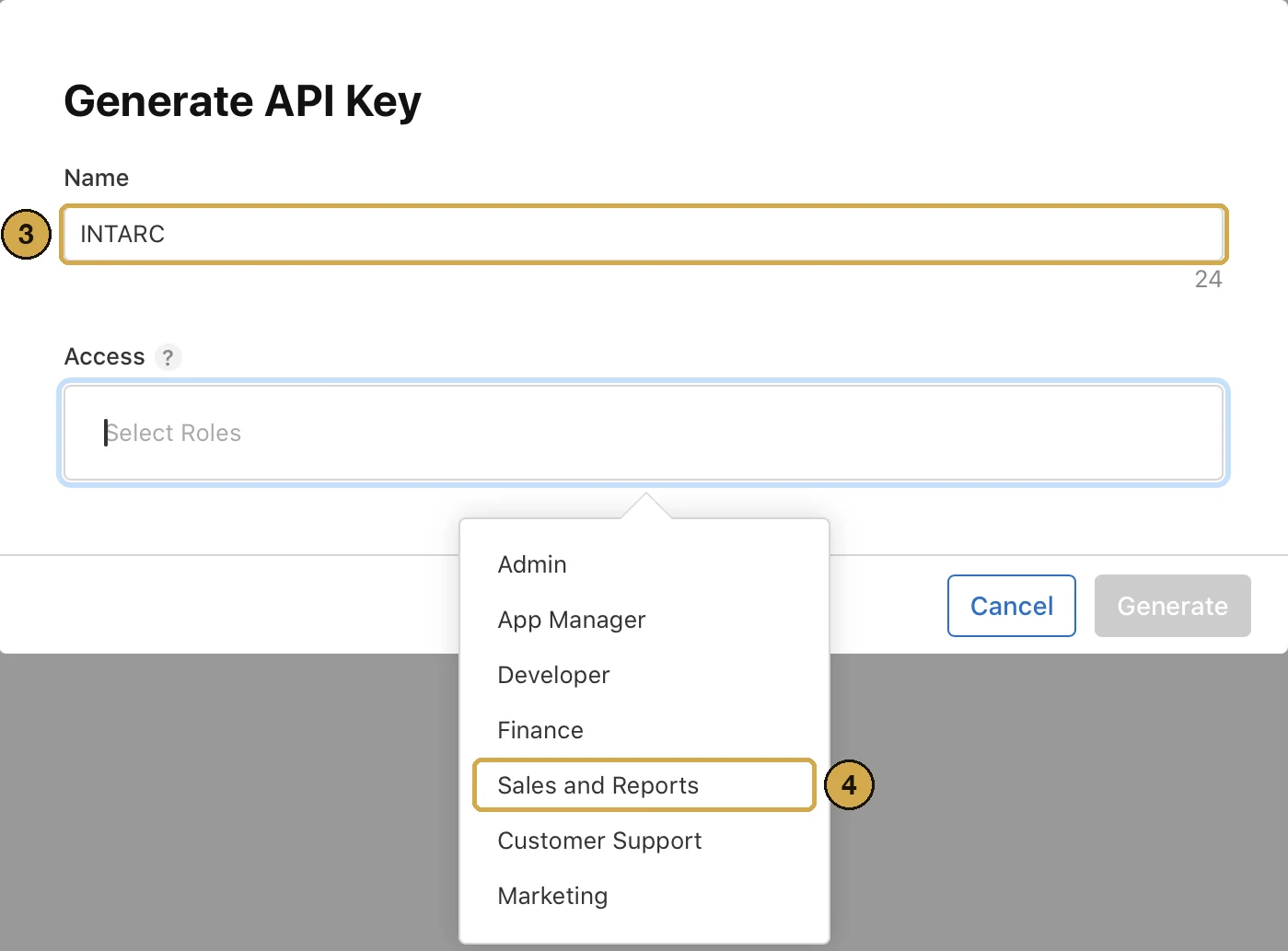
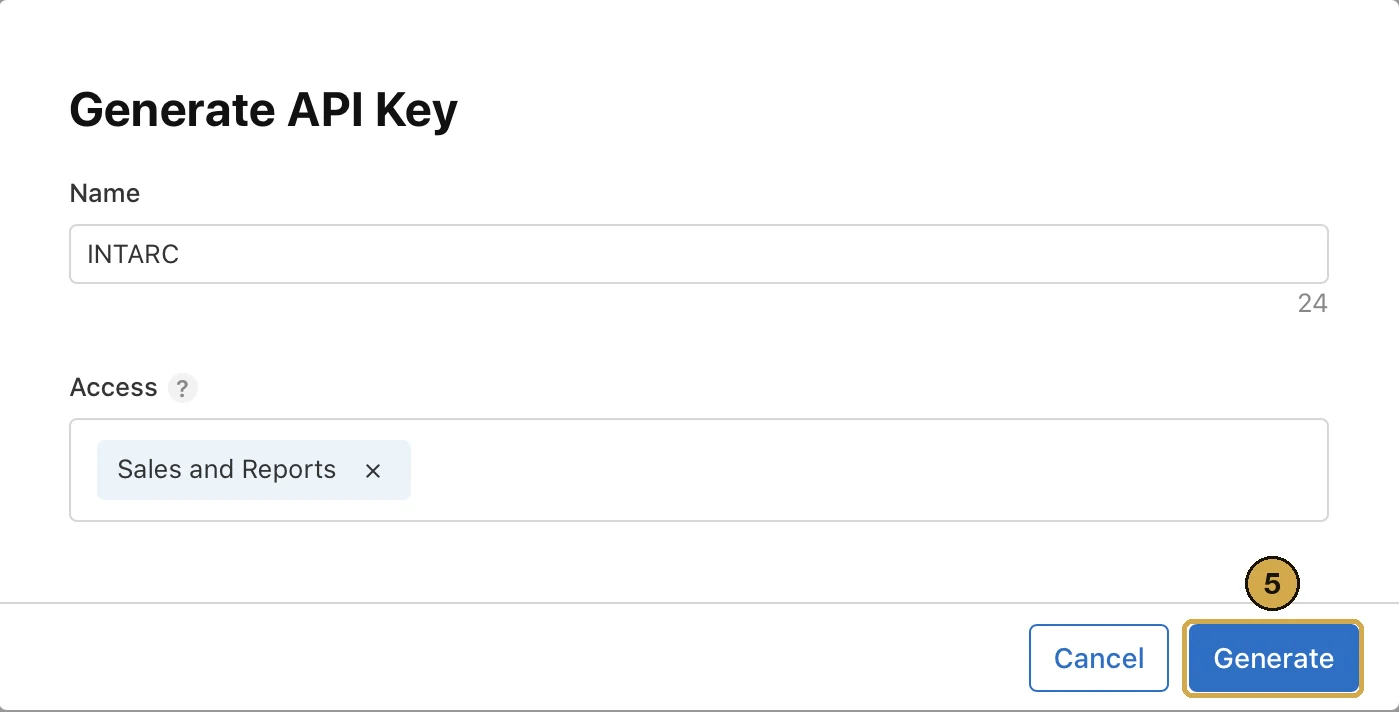
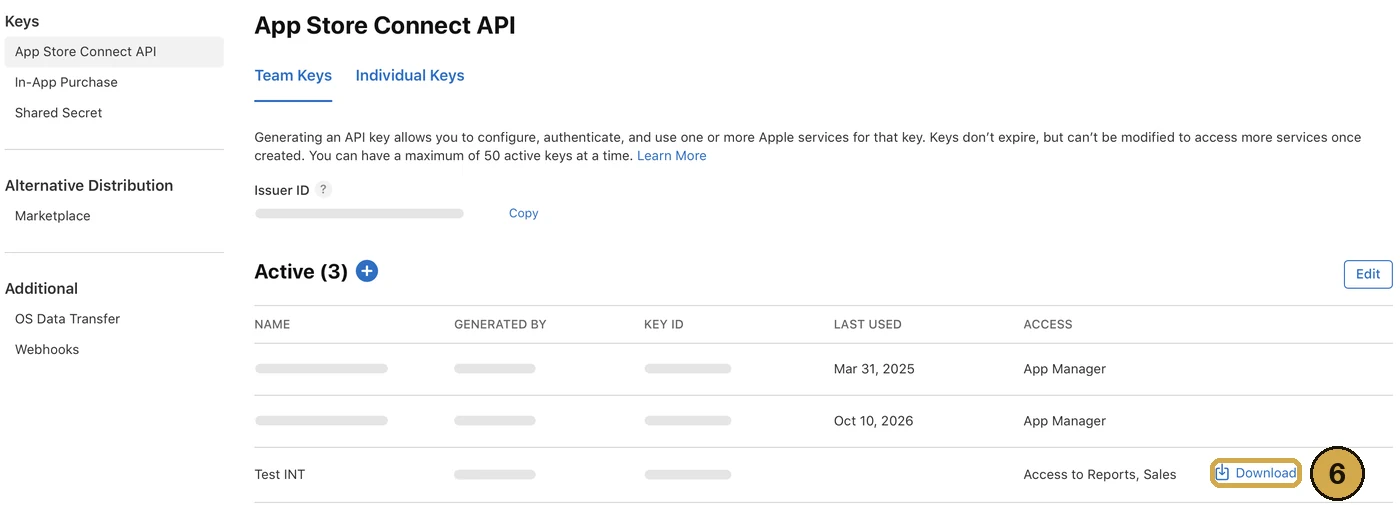
AuthKey_ followed by the Key ID, which is how INTARC reads the Key ID without you typing it.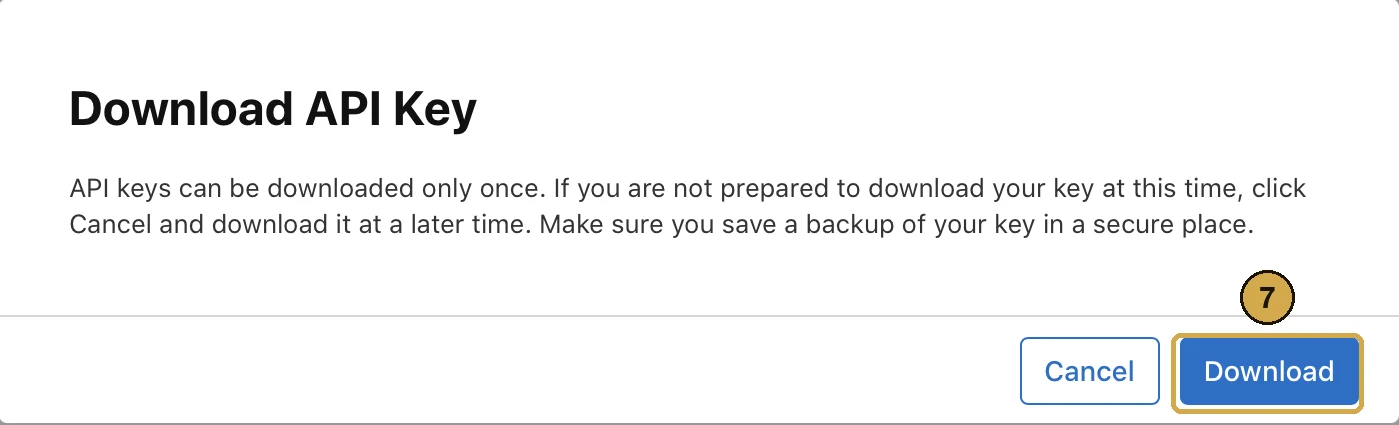

Downloads by source. With a key that has the Admin role, INTARC also asks Apple for the analytics report that splits first-time downloads into App Store search, browse, app referrers and web referrers. Apple takes a day or two to produce the first one. These downloads then become the install count INTARC measures your ads against, and it can tell you how much of what your ads caused came through search. A Sales key still covers everything else.
Find the vendor number
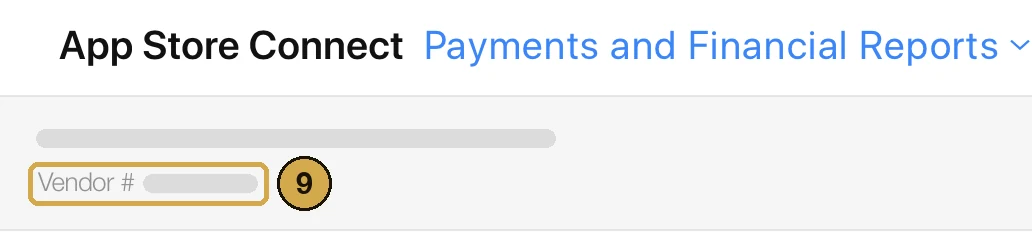
Connect it in INTARC
.p8 file on the form, or click to choose it. INTARC reads the Key ID from the file name; if you renamed the file, it asks you to type it. 11Paste the Issuer ID. 12Type the vendor number. 13Click Continue.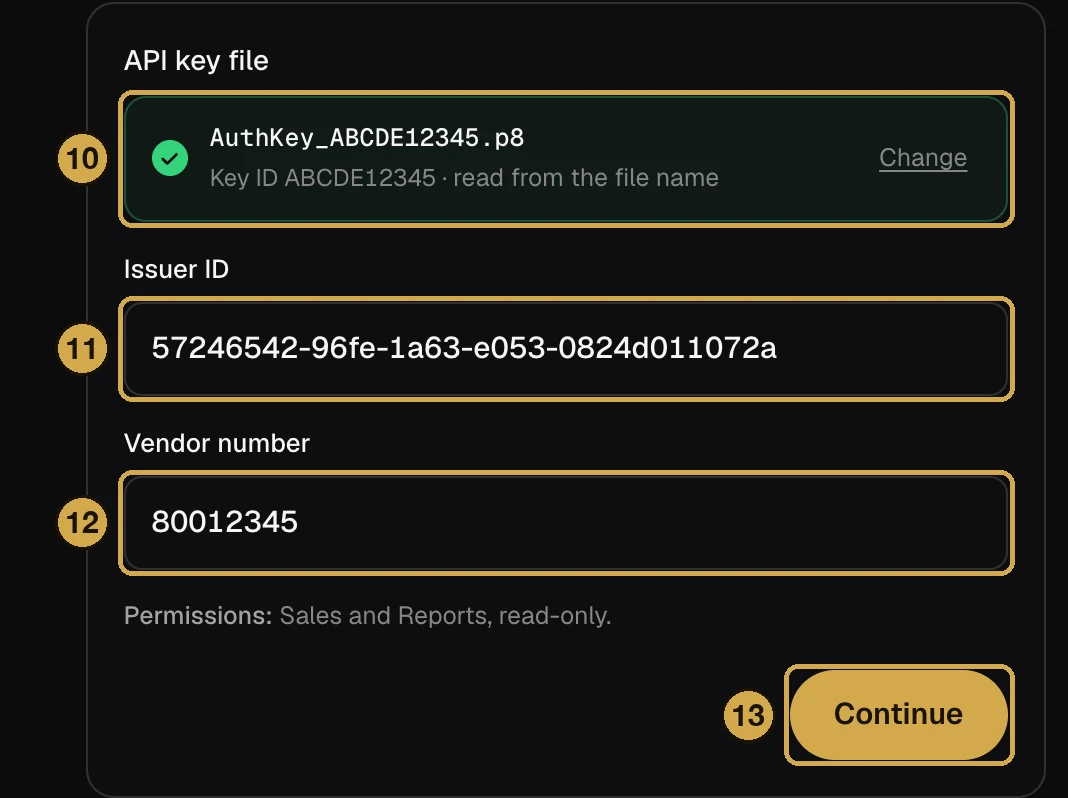
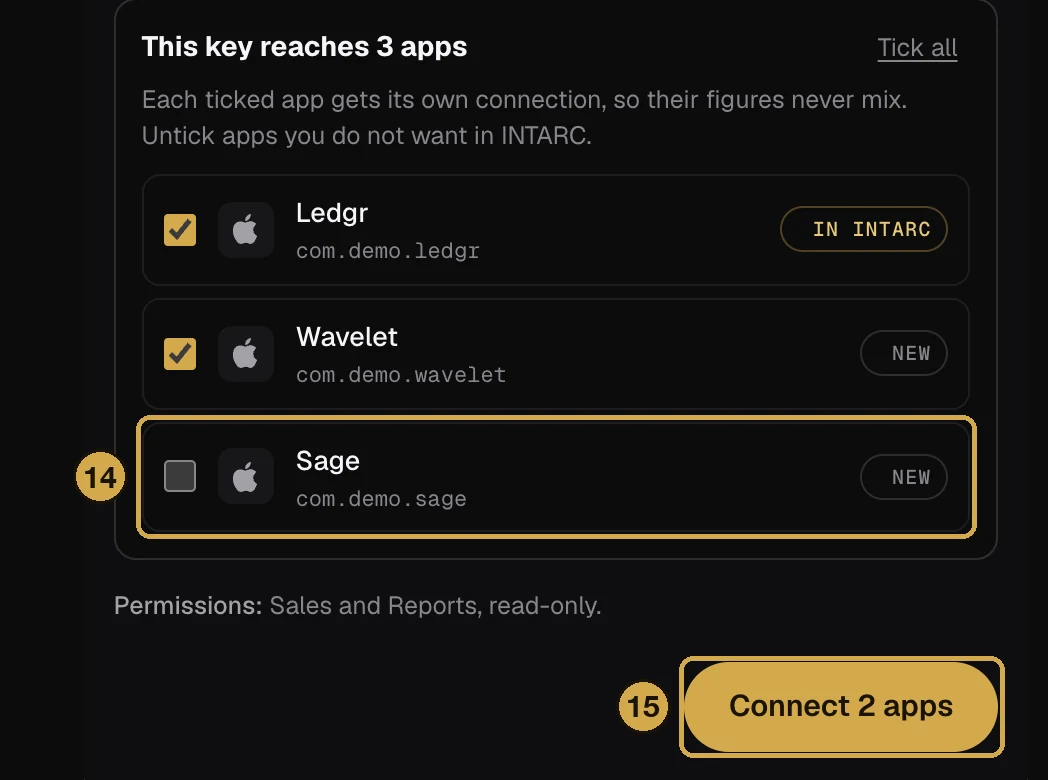
To add more apps later, open App Store Connect in INTARC again and use the same key file. An account with a single app connects as soon as you click Continue.
Reports lag one day. Apple publishes yesterday's sales report around 08:00 UTC. INTARC never shows today, anywhere, for that reason.
Google Play
Google has no single key. You create a service account in Google Cloud, invite it to your Play Console, and point INTARC at the bucket where Google writes your reports. Three values in total.
Create the service account
- Open Google Cloud, IAM & Admin, Service Accounts. Any project is fine, this account only exists to identify INTARC.
- Click Create service account. Name it
intarc-reports. Skip the optional role and user steps and click Done. - Open the new account, go to the Keys tab, click Add key, Create new key, choose JSON. A file downloads. Open it in a text editor and copy the whole thing.
- Note the account's email. It ends in
.iam.gserviceaccount.com.
Invite it to Play Console
- Open Play Console and go to Users and permissions in the left menu.
- Click Invite new users and paste the service account email.
- Under App permissions add the app, then tick View app information (read-only) and View financial data, orders, and cancellation survey responses. Nothing else.
- Click Invite user. Service accounts accept instantly, there is no email to wait for.
Find the reports bucket
- In Play Console open Download reports in the left menu, then the Financial tab.
- Click Copy Cloud Storage URI at the top right. It looks like
gs://pubsite_prod_rev_0123456789.
Paste into INTARC
Fill in the package name (like com.studio.app), the whole service account JSON, and the bucket URI. INTARC confirms the invitation worked and that the bucket is readable before saving anything.
Earnings arrive monthly. Google writes earnings reports after each month closes, so the most recent weeks fill in at month end. Daily installs arrive every day.
AdMob
If your apps show ads through AdMob, INTARC reads what they earn straight from AdMob. It works for any app, whatever SDK it runs, and brings in past months too.
Connect it
In INTARC, open Sources, choose Connect next to AdMob on any app, then Continue with Google. Sign in with the Google account you use for AdMob and allow INTARC to see your AdMob data.
Back in INTARC you see every app in your AdMob account, each matched to an INTARC app by its store ID or its name. Check the matches, set any app you do not want read to Not in INTARC, and connect. An app on iOS and Android takes both of its AdMob apps.
What INTARC reads
Estimated earnings and impressions per app and day, from the AdMob Network and from every ad source you mediate through AdMob. The earnings count in your revenue and pay no store fee, so the store's cut is taken from purchases only. When RevenueCat also reports ad revenue for the same app, AdMob's figure replaces it, so nothing is counted twice.
Estimates. AdMob's daily earnings are estimates it settles at the end of the month, so INTARC reads the recent weeks again on every sync. They are not split per user: they show in revenue, profit and return on ad spend, not in cohort payback.
Meta Ads
Click Connect Meta Ads in INTARC. One-click sign-in is in Meta's review, so until it is approved only testers see Continue with Facebook. If you do, log in with the account that manages your ads, tick the ad accounts INTARC may read and confirm; you land back in INTARC with the accounts connected and the first sync running. INTARC asks for View performance only and never edits campaigns or budgets. Everyone else, and anyone who prefers a token of their own, takes the system user path below: ten minutes.
The system user path, every screen named.
Meta tokens are issued to a system user, a robot account inside your Business portfolio that never leaves the company. The system user needs two things handed to it before a token can carry permissions: your app and your ad account. Ten screens, two values to paste.
Create the system user

INTARC. 3Leave the role on Employee. 4Click Create system user.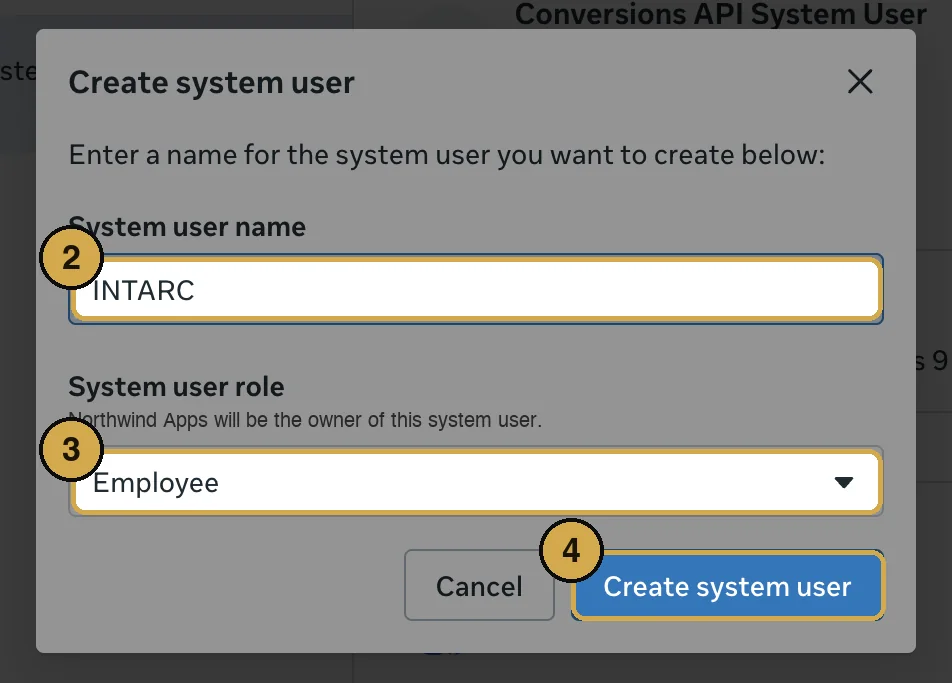
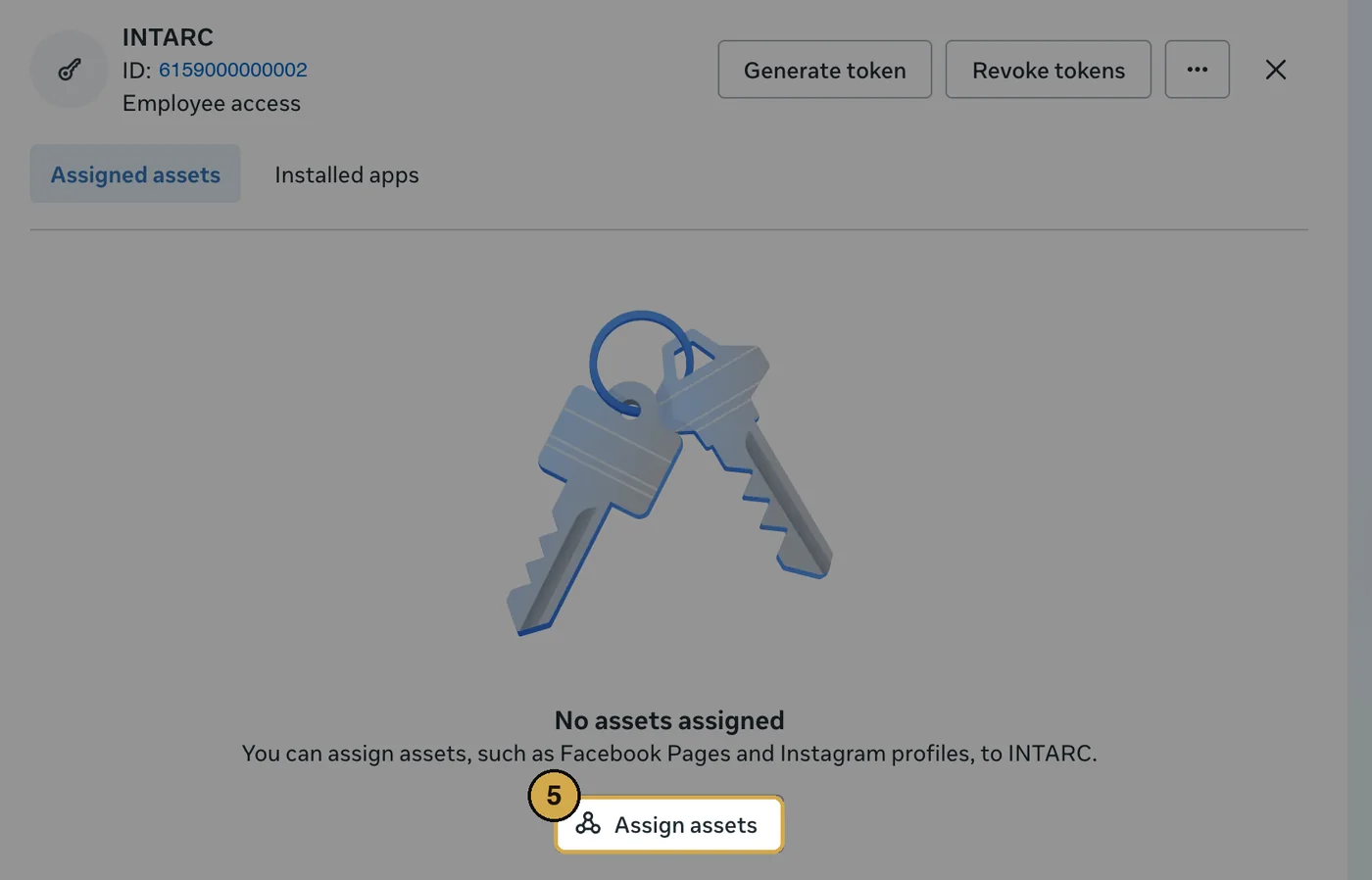
Hand it the app and the ad account
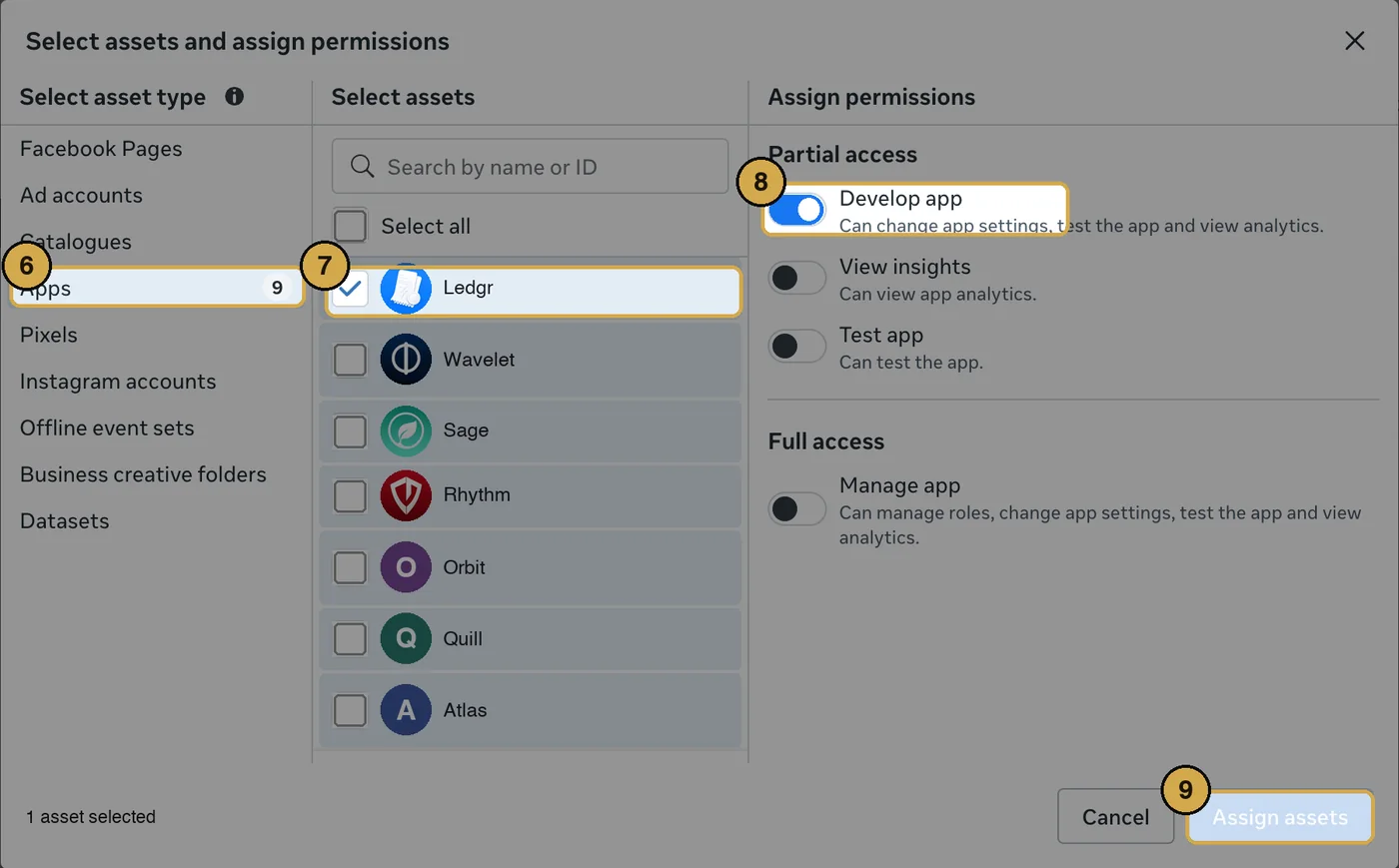
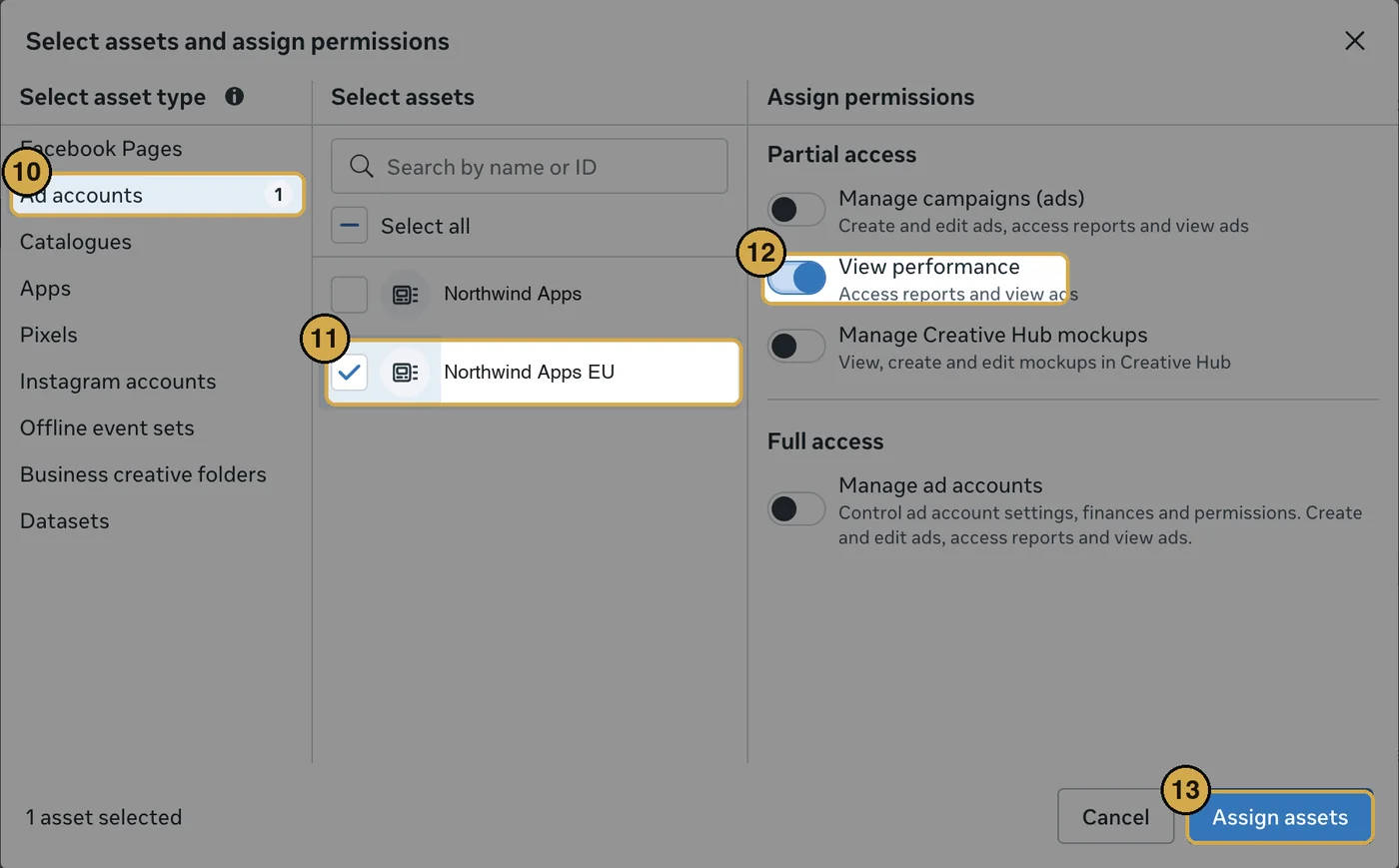
Why all of them. A system user token sees exactly what you assign here and nothing else. INTARC reads every ad account the token can see and routes each campaign to the app it promotes, so one token covers every app you add later. If you assign only one account, campaigns for your other apps stay invisible until you come back and add the rest. You never need to reconnect: an account assigned later is picked up on the next sync.
No app in the list? You need one to carry the token; it never has to be published. Open developers.facebook.com, click Create app, choose Business, add the Marketing API product, then come back to step 6.
Generate the token
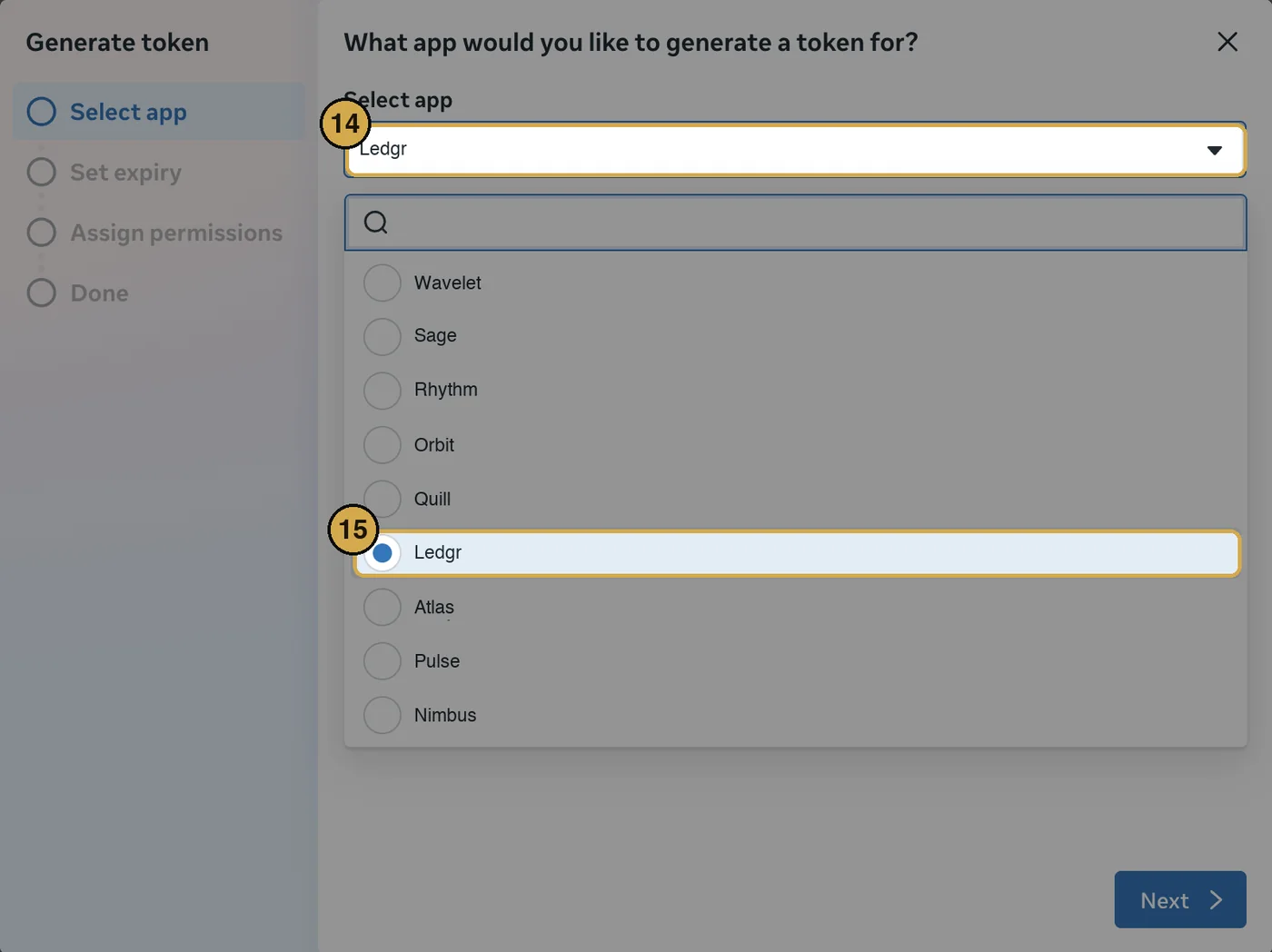
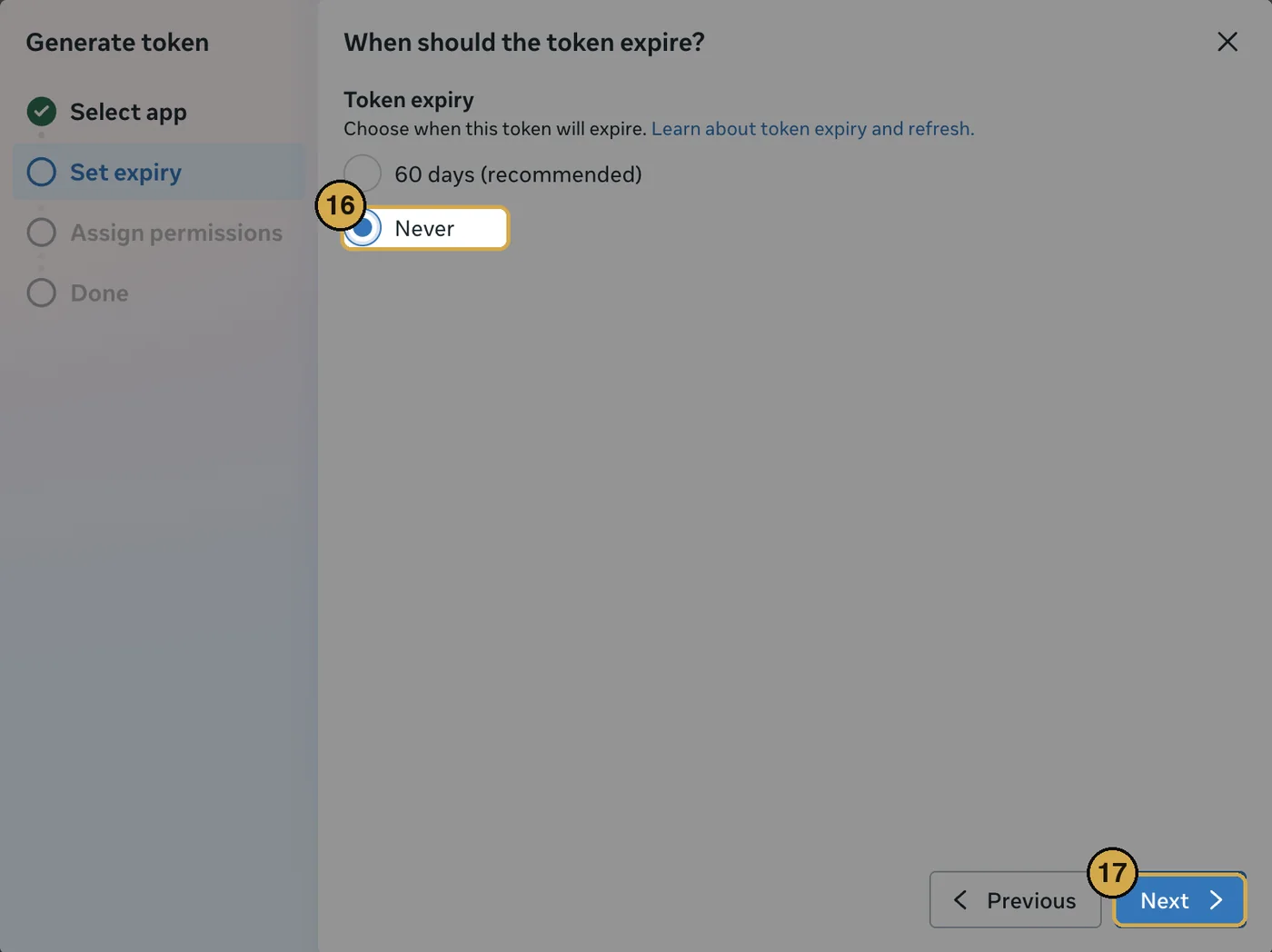
ads_read and nothing else. 19Click Generate token.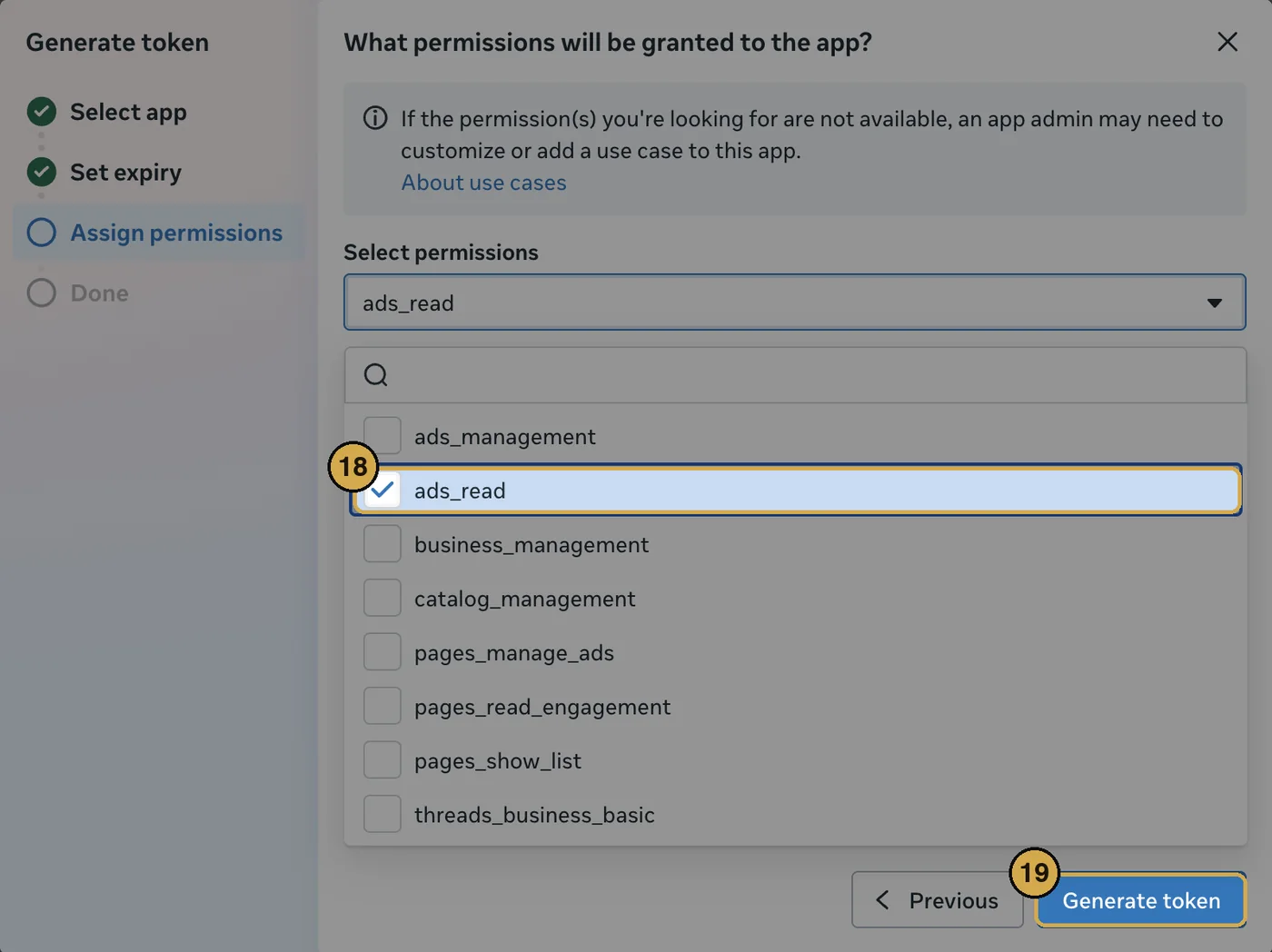
EAA.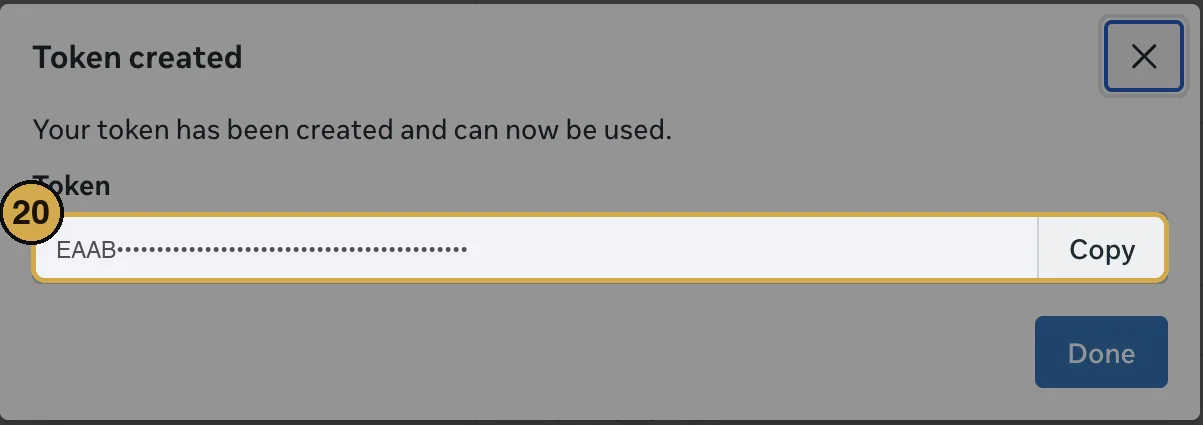
Find the ad account ID
act_ prefix.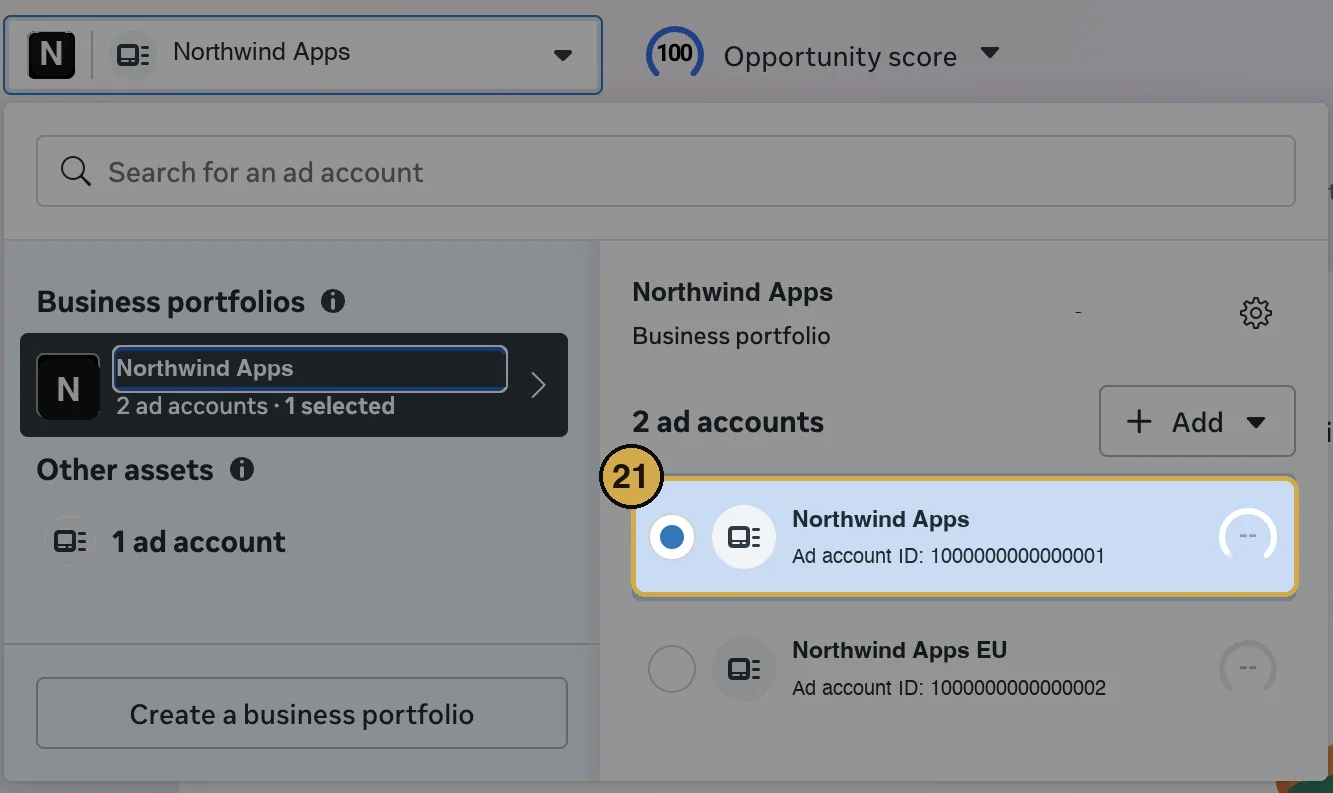
What INTARC reads
Daily campaign rows: spend, impressions, clicks and app installs from the actions column. INTARC never edits a campaign, a budget or an audience, and the token cannot, because ads_read is the only permission on it. If Meta refuses the account, INTARC asks the token what it can see and tells you which of the steps above was skipped.
Trials and purchases per campaign
Meta reports installs per campaign on its own. For trials, payers and revenue per campaign, Meta has to receive the events: in RevenueCat open Integrations, add Meta Ads and follow its two fields. From then on INTARC's Campaigns panel shows, for each campaign, what it cost, how many trials and payers Meta attributes to it, and whether it pays back against what a payer returns in a year. Attribution is Meta's model, so the panel always shows how many of RevenueCat's payers it accounts for.
How INTARC reads your budget
The Budget panel answers one question: how many extra customers did each dollar on each channel cause? It does not ask the ad networks who to credit. It reads your own history: on days a channel happened to spend less, how many fewer new customers arrived, with everything else held steady.
Daily new customers are regressed on each channel's daily spend, with carryover into the next day, diminishing returns, weekday effects and an organic baseline. Effects cannot be negative and are gently pulled toward the blended average until the data earns a difference. Carryover and curvature are chosen by holding out the last two weeks. Uncertainty comes from refitting on resampled weeks, two hundred times.
A channel is reported only when its spend varied enough, on at least four weeks of days, independently of the other channels, and its effect is clearly above zero. Otherwise the panel says why, and when two channels move in lockstep it proposes a budget-neutral two-week variation that makes them readable. Campaigns are read inside their channel on the app's own page, with stronger pull toward the channel's answer.
Before the model has four weeks of daily data, the Budget panel shows a simple read instead of nothing: each channel's spend in the period against what its installs are worth on your funnel, labelled low confidence. The full model replaces it as soon as it can read.
Money follows from your cohorts: what a customer is worth over a year after the store's cut, less the ad levy where one applies. A move between channels is recommended only when its gain, re-valued under every resample, stays positive. Every move you approve is measured for fourteen days and calibrates the next forecast.
Limits, stated plainly: it needs daily spend per channel, so a channel entered as a monthly cost cannot be read; a press mention or a feature lands in the baseline for a while; subscription money arrives with a lag, which is why the signal is new customers and the value comes from cohorts.
How INTARC reads your campaigns
Each campaign is judged against the rest of the app's spend in the same period, not against a rule of thumb: its cost per install, how far it sits from the others, and whether that gap is real or noise (installs are counted events, so the test is a Poisson rate comparison). Inside each campaign, the first half of its active days is compared with the second: a falling click rate with flat prices reads as creative fatigue, rising prices with a steady click rate as the auction, a falling cost per install as learning.
Campaigns rarely run alone, so INTARC also reads configurations: the set of campaigns that spent together, from the day the set changed to the day it changed again. Each configuration is priced on your own RevenueCat payers in that window, above the floor the app earns on days without ads, which gives a cost per incremental payer and, against what a payer returns in a year after fees, a payback multiple. That is how a period that looks unprofitable as a whole can show that its latest configuration pays back.
Cheap installs are the classic trap: a broad campaign finds people happy to download and never open the paywall, and on cost per install it looks like the winner. So INTARC reads install quality: the first paid step (a trial, or a purchase where the app sells without trials) per install, per campaign. Where Meta attributes trials, those are used; otherwise each day's incremental trials are shared out among the campaigns that bought installs that day, in proportion to their installs and their estimated yield, iterated to the best Poisson fit, so a campaign that ran alone on some days is priced exactly. Campaigns are then compared on cost per trial, and one whose installs take the first step at half the rate of the rest, with the gap beyond noise, is marked hollow: a leak in Profit hiding, never a restart recommendation, however cheap its installs.
A configuration is priced on observed payers once it has about three incremental payers and seven days. Before that INTARC does not go quiet: it values the installs on the app's own funnel (payers per install over the last 90 days, times what a payer returns in a year after fees) and shows the projected payback, labelled low confidence, with the payers seen so far. The same projection gives a break-even price per install, so even a fortnight of spend says which campaigns bought installs for less than they bring back.
A read that can be fooled is worse than no read, so the campaign engine checks itself against the ways campaign numbers mislead. The bar for a verdict rises with the number of campaigns, so ten similar campaigns do not produce an invented winner. Day-to-day swings in installs wider than chance widen every test. Each campaign is compared with the rest on the days it actually ran where possible; campaigns from different periods are marked so, and a price gap that the auction explains (ad prices up as much as the cost per install) is called the auction, not the campaign. The last two days stay out of comparisons while install attribution settles. A campaign under five days old is read as early, not cut, since the first week settles its price. Retargeting, awareness and traffic campaigns are never judged on cost per install. Spend with no installs reported is flagged as an attribution problem. Days with an organic surge are left out of the trial reads, so a feature or a press mention is not credited to whoever was buying installs. Payers are counted a trial length after the installs, with the lag read from the app's own days, so a configuration is priced on its own payers and a short one is marked while they are still arriving. Trials that start but rarely pay are caught as the second trap, and once enough payers have landed they outrank trials and installs in every verdict. Refunds and two platforms claiming the same installs are called out. Before each release the engine runs against a suite of synthetic traps built to trigger each of these mistakes.
INTARC reads what each campaign optimizes for (installs, trials, purchases) from the ad network and shows it next to the campaign. Cost per install is only compared between campaigns after the same goal: a campaign buying trials pays more per install by design, so it is never cut, and an install campaign never crowned, on that comparison alone. Where Meta attributes trials, subscriptions and purchases to campaigns, those appear per campaign too, labelled as the platform's attribution.
Money is the judge; installs, trials and the event a campaign optimizes for only predict it. So a campaign's first paid step counts trials and plans bought outright: a campaign whose people skip the trial and buy the yearly plan is never read as one whose installs do nothing, and those buyers count as payers on the day they buy. When the app's own conversion moves between two campaign periods (a new paywall, a price, an offer, a release), each day is measured against days without ads near it, the comparison allows for the change and INTARC names it; when nothing can show whether the app changed and the periods are weeks apart, it does not judge their quality at all. A source that suddenly reports nothing for days is a tracking gap, left out of every read and flagged in the bell. And if an app also earns from ads or web purchases, set it under Sources, Economics: INTARC then never calls a campaign hollow, or cuts it, on store conversions it can see alone. Payers are weighted by what their plan brings in a year, from each plan's price and how often it really renews, so fewer yearly buyers can beat more weekly subscribers who rarely renew. A win-back campaign is judged on the lapsed subscribers who come back on its days. A recommendation to move budget says how much the receiving campaign can absorb before its next installs cost more. And where one network's ads feed another's results (Meta lifting Search Ads) or one app's ads lift another app, INTARC measures it, never compares the two as rivals, and says what a cut would also cost. Campaigns that buy installs clearly dearer or cheaper than the rest also show up in Profit hiding as leaks and gains, with a monthly value, and the analyst can answer any question about them.
Pricing
A paywall sells as a whole: a dear plan makes a cheaper one look reasonable, and a plan nobody buys can still lift the others. So Pricing reads the paywall, not a single package. Your paywall shows its line-up in order (from RevenueCat's offerings), each package's price, its share of buyers, and what it brings per new customer; together they add up to the paywall's value per new customer: buyers over new customers, times what a buyer brings in a year after store fees, net of refunds and free grants. A subscription's year comes from its measured renewals; where RevenueCat does not have enough of them yet, the value rests on an assumed rate and is marked "~".
A new paywall version starts whenever the offering on show changes or any package's list price does. Prices are read from new purchases, as the median of daily prices in the top country where it has enough of them, so renewals at an old price, refunds, free grants, exchange rates and country mix do not pass for a price change. Each version is compared whole with the one before: line-up, how many new customers bought anything, how buyers moved between packages, and value per new customer with a 90% range, with a warning when paid traffic moved at the same time. When the best period had the same line-up as today, Pricing says the gap is your traffic, not the paywall.
Best paywall proposes complete paywalls to test against the current one in RevenueCat Experiments: the best past version brought back, the same paywall with its main package priced where your history points, or the paywall without packages nobody buys. Each comes with the change a 50/50 test can detect in four and eight weeks at your traffic, and says so when the traffic is too low for any test to read. Each package's own price history, including a demand curve when it has sold at three or more prices, is kept underneath as detail.
Breakdowns and filters on charts
Every chart can be broken down and filtered. Break down by app, by platform, or, on net profit and gross to net, by cost line, which draws revenue and each cost so you can see which one moved the net. Acquisition and money charts can also be broken down by ad network and by campaign: the six largest campaigns by spend get their own line and the rest are grouped.
Filter narrows any chart to some apps, one platform, one ad network, chosen campaigns (search them, or pick the running ones, the ones INTARC reads as Keep or Scale, or the ones it reads as Cut or Hollow), and weekdays or weekends.
When a money chart is read per campaign it becomes a campaign view. Spend, impressions, clicks and installs are exact, from the ad platforms. Trials and paying users per campaign are what the ad platform attributes where it does; otherwise each day's new payers above the app's organic floor are shared among the campaigns that bought installs that day, weighted by how well each campaign's installs convert, a trial-length later. A payer is valued at what one returns in a year after store fees, from your own cohorts, so net profit becomes contribution: that value minus the campaign's spend. These views say "estimated" in the header, and days whose payers are still arriving are left out of the money figures.
What your ads really cost
Ad networks count what they can attribute. Someone who sees an ad and later finds the app in the store search never shows up in their numbers, and a network can also claim installs that would have happened anyway. So the cost per install, trial or purchase a network shows is rarely the real one.
INTARC measures instead. Your app's own installs, trials and paying users on days without ads, and not in the two days after one, set its organic level, adjusted for the day of the week and for any trend those quiet days show. What the app gets above that level while ads run is what the ads caused. Divided into the spend, that is the real cost. Where several networks run, the lift is split by how your numbers move with each network's spend when their schedules differ enough, and by what each network reports when they ran on the same days.
Every figure carries a 90% range and a confidence. When the range includes zero, INTARC says the ads show no measurable lift rather than pricing noise. When ads ran every day at a steady level, it says it cannot tell organic from paid yet, and what to change so it can: pause for a few days, or move the budget by a third for a week. Quiet days that all sit before the ads describe an older normal, so the confidence is capped. Search ads you have not connected, press and seasonal swings count as organic.
Ads usually reach a few countries, while organic installs come from everywhere. So INTARC measures country by country where the ads ran and adds those up, never crediting the ads with growth in markets they did not reach. The countries without ads then act as a control: if they rose by a fifth between the quiet days and the ad period, the organic level in the ad countries is raised by a fifth too, which removes store features, seasons and other swings that hit every market at once.
On top of that, INTARC learns each network's multiplier: how many real installs, trials or paying users arrive for every install the network reports. The multiplier is close to stable within a campaign, so once it is known it prices every day, including weeks of steady spend where nothing moved. It is measured four independent ways and pooled: from quiet days; from every launch, pause and budget step, seven days after against the seven before, with countries without ads as a control; from week-to-week budget swings inside weeks with ads, using spend as the instrument so the day-to-day wobble of a network's own count cannot bias it; and across countries when the ads reach several. Methods that agree tighten the range, methods that disagree widen it and lower the confidence. Each campaign gets its own multiplier from its own launches and budget steps, pulled toward its network's when the evidence is thin, and the Campaigns comparisons use real installs, so a campaign the network merely undercounts is never mistaken for a worse one. For trials and paying users, a campaign without evidence of its own takes its share of the network's real count by the trials or payers the network attributes to it, never by its installs, which would make cheap installs that never convert look like cheap trials. With too few attributed per campaign, INTARC uses its own read of each campaign's results, from the days it ran alone or against days without it, scaled to the network's measured total and marked with a "~"; campaigns that always ran together in the same proportions are not split. Paying users are matched to the installs they came from, a trial length earlier, so that view covers ads up to a trial length before today. When the network itself shows no measurable lift, its campaigns are not priced either, and when the counts are too small to measure anything (a few trials a month), INTARC says so rather than reporting no lift. When a multiplier moves, for example after a network changes how it attributes, INTARC flags the date and prices each side with its own.
The most you can pay
The multiplier also gives each network a bid ceiling: the highest cost per install, as that network reports it, at which its spend still pays back. It is the paying users that arrive for every install the network reports, times what a paying user brings in over a year, divided by 1.2 so that each dollar spent at the ceiling comes back as $1.20 within the year. The Real cost panel shows it under each network beside what you paid over the last 28 days, with its range. While a network buys above its ceiling, INTARC holds any advice to scale it and the app's status reads Hold.
This is the only number to compare with a network's cost per install. What a new customer brings in, shown in Insights, is value per customer on RevenueCat's count. A network reports a different count, often far fewer or more installs than really arrive, so that value is never a bid on its own.
Choose a country to read the same thing for one market. Countries come from RevenueCat's charts and App Store Connect's sales reports on the outcome side, and from Meta's country breakdown on the spend side. In Charts, the Real cost per result chart plots the measured cost against what the networks report, week by week, and the Country filter narrows installs, trials, paying users, revenue and ad delivery to one market.
Making it exact
The read gets sharper with every source you connect and every change you make to your ads. These are the parts that do the sharpening.
Days that line up
Meta reports in your ad account's time zone; RevenueCat, the stores and Search Ads report in UTC. A day of ads in New York runs into the next UTC day, so INTARC splits each ad day across the UTC days it covers before comparing anything. Without that, a Monday budget step shows its effect partly on Tuesday and every method blurs.
Installs from the stores
When App Store Connect's downloads by source, and Google Play's installs, cover every platform the app is on, they replace RevenueCat's new customers as the install count. They are the stores' own first-time downloads, the closest thing to the truth. The App Store's split by source also shows how much of what each network caused arrived through App Store search, which is the halo the networks never report.
Hour by hour
Add the RevenueCat webhook from Sources and every trial and purchase reaches INTARC within seconds. Meta's delivery is read by the hour too. Hours with more delivery than that hour usually gets, on the same day, are compared with the trials and purchases in those hours, so a day gives twenty-four small experiments instead of one. This becomes one more method in the multiplier once two weeks of hours exist.
Checking itself
Every day INTARC replays the last six weeks: it forecasts each day from the data before it, then compares the forecast with what happened. The Real cost panel shows how often the truth fell inside the 90% range and how far off the forecasts were. If that falls well below 90%, the ranges are too narrow, and INTARC says so. INTARC's public record of every forecast it makes is described in How INTARC scores itself.
The next dollars
The real cost of a campaign is an average. The next hundred dollars usually costs more, because a campaign saturates. INTARC fits each campaign's response to its own spend and shows what the next dollars would buy, and what each campaign and country really returns over a year once real installs and your revenue per install are counted.
Creatives
The same multiplier prices each ad inside a campaign, so two creatives are compared on what they really brought in, not on what the network could attribute.
An experiment, when the data cannot tell
When the read is uncertain, the Make it exact tab lays out the cheapest test that would settle it: pause a network for a few days, hold one country out, or move the budget up and down by 40% for a week. Each comes with its cost and how much tighter the range would get. Schedule it puts it under Decisions, and INTARC reads the result when it ends.
Alerts
The bell and the Overview tell you when a network's multiplier moves, when a campaign is buying installs that never convert, and when a country's real cost doubles. Each alert can be dismissed.
Apps like yours
Under Account, Contribute to benchmarks lets a workspace share ratios, never amounts: each network's multiplier, the payback ladder's steps and monthly retention, per app category, under a one-way hash of the workspace. Once twenty or more workspaces have shared for a category, every workspace in it will get the pooled figures as a starting point for apps whose own evidence is still thin. They will count as one more method and can never make a read confident on their own.
Ask INTARC
The Ask button opens an analyst that can read everything INTARC has on your workspace: the money statement for any app over any dates, every chart, the leaks and gains, the weekly cohorts, the funnel, the verdict, the Insights remarks, the budget model, your past decisions and your setup. You do not collect anything first. Ask the question; it fetches what it needs.
It reads by country too: ask about the United States, Germany or any market and it breaks new customers, trials, paying users, revenue and ad spend down by the customer's store country. It reads the Real cost panel, so a question about what Meta really costs per install gets the measured figure with its range, not the network's claim. It reads the paywall, the bid ceilings and your decisions. And it never does arithmetic in its head: every division, rate or difference goes through a calculator, and the answer shows the formula ('66 of 3,031 new customers, 2.2%').
Every figure it gives names three things: the app, the period and what was counted. That matters most for installs, which different sources count differently: an ad network reports only what it attributes, a store reports downloads, RevenueCat counts every first-time customer. The analyst says which one it is reading and never divides one by another. It also never promises to look something up later: it either reads it now or says plainly what INTARC does not track and gives the nearest thing it has.
It never computes a figure of its own. Each thing it reads is produced by the same engine that draws the dashboard, in your browser, at the moment you ask, so an answer about last month's ROAS for one app is the number the ROAS chart shows for that app and that month. Under every answer sit small capsules naming what was read. Click one and INTARC opens that very view, with the app and the period already selected.
What leaves your browser: your question, the conversation so far and the computed figures the analyst reads, sent to OpenAI to write the answer. Never a credential, never a raw export, never anything it did not need for the question. The analyst only reads; it cannot change a campaign, a cost or a setting.
It answers in your language. Ask in Turkish or French and the answer, the follow-up questions and the figures' labels come back in that language, with the dashboard's own number format.
How INTARC scores itself
INTARC writes down every forecast it makes on the day it makes it, before the truth exists, and scores each one when the truth arrives. The record is public at intarc.app/proof: aggregates only, never an app, a workspace or an amount.
The ledger
Every night, after the overnight syncs, the engine opens each workspace's dashboard, the same page you see, and writes down the forecasts on it: one row per forecast, with the day it was made, the last day of data it saw, the day its truth arrives, the forecast and its range. When that day comes, the same engine fills in what happened. A row never changes after it is written, except to receive its actual once; the database refuses any other edit.
What is forecast, and when it is scored
| Forecast | Scored against | Scored |
|---|---|---|
| Cohort revenue | What a week's new customers pay by day 7, 30, 90, 180 and 365, against what they then paid, from RevenueCat | The day after the week's youngest customer reaches that day |
| The next 30 days | Net profit and revenue per app and per workspace, against INTARC's own daily statement for those 30 days | The day after the 30 days end |
| Calls on spend weeks | Two weeks after a week with spend closes, INTARC calls it ahead, on track, behind or won't pay back. The call is scored on what that week's customers paid per unit of spend | By day 90, and again by a year |
A cohort is forecast again every day until its truth arrives, so rows are grouped by age, the days from the end of the cohort's week to the forecast: 0 to 6 days is the headline, then 7 to 13, 14 to 27, and 28 or more. The ledger also keeps kinds /proof does not score, such as the day a week pays back, a day's store proceeds and Apple's monthly payout; they are in the downloadable ledger too.
The five figures
| Figure | In plain words |
|---|---|
| Dollar-weighted error | Every miss added up, divided by every actual added up. A miss on a big week counts for more than a miss on a small one. |
| Median error | The middle miss, as a share of its own actual: half the forecasts missed by less. |
| Bias | Every forecast added up, over every actual added up. 1.00 means no lean; above 1.00 the forecasts ran high, below 1.00 they ran low. |
| Within 50% | The share of forecasts within half of the actual, either way. The easiest test of the five, so read it beside the others. |
| In range | The share of actuals that fell inside the range INTARC gave, shown with how wide the range was, since a wide enough range is always right. |
The first four count rows whose actual is above zero. A cell with fewer than ten rows, or a call with fewer than five weeks, prints too few instead of a figure. Calls are scored on two truths: all of the week's customers, a ceiling, and the customers INTARC attributes to the spend. The second rests on the model's own split between the ads and organic, so it changes with the model: the model frozen on 29 Oct 2026 splits each day's customers by the ads' share, from spend, network reports and countries reached; the models before it counted the customers above the organic floor.
The frozen model
The model that makes the forecasts is frozen: its code is tagged in git, with a tag such as model-2026-10-29, and fingerprinted. The fingerprint is the sha256 of the model's marked blocks in the dashboard's own code, so it changes if one character of the model does. Every row carries the fingerprint of the model that made it, and the live record counts only rows from the frozen one; rows made by any other model are counted apart. /proof prints the tag, the commit, the day of the freeze and the fingerprint, beside the fingerprint of the model served today and the sha256 of the page that serves it, so anyone can check that the model scored is the model running.
The replay, and the live record
The live record grows only as fast as the calendar: a forecast of day 365 takes a year to score. So /proof also shows a replay: the frozen model run over the past two years at weekly cut-offs, each time with only the data that day had, then scored on what followed. A replay is labelled as one everywhere, because it cannot prove it was made in advance, and it is in sample: the model was built on that same history, and /proof lists what was run and corrected before the freeze. The live record is the out-of-sample test, forecasts written down before their truths exist. /proof shows the two side by side, so you can see whether they agree.
Check it yourself
Every figure on /proof comes from three public files, built from one snapshot of the database so they always agree:
| File | What it holds |
|---|---|
| /proof.json | Every figure /proof prints, the rules behind them, and the frozen model's tag, commit, dates and fingerprint |
| /proof/ledger.csv | One line per forecast in the ledger: its kind, its dates, the forecast and its range as ratios to the actual, and its hash. No names, no amounts |
| /proof/digests.txt | The daily digest chain: each day's new rows, the actuals that arrived and the rows removed, folded into a digest chained to the day before, so a changed or deleted row breaks every later link |
To recompute every figure and check every link yourself, download verify.mjs and run it with Node 18 or later, nothing else:
curl -O https://intarc.app/proof/verify.mjsnode verify.mjs https://intarc.app
It fetches the three files, recomputes every figure from the ledger lines alone, checks every link of the chain and that the ledger has no live row the chain did not count, and checks the dashboard served today against the fingerprint /proof states. It exits 0 when everything matches and 1 on any difference.
Languages
INTARC comes in English, Turkish and French. A visitor in Turkey sees it in Turkish and a visitor in France in French, from the first page; everyone else sees English. The choice is yours after that: the switch sits in the footer of every page and in the menu of the landing page, and inside the app under Account. The language you have when you sign up becomes your account's language, so it follows you to any browser you sign in from.
Everything follows the language: the site, the sign-up and connecting steps, the guides, the dashboard, the analyst's answers and the emails INTARC sends you. Numbers, money and dates keep the dashboard's own format, so a figure reads the same in a chart, in a sentence and in an answer. App names, product names and network names are never translated.
Sentences the dashboard writes from your own numbers are translated once, with the figures lifted out and put back, and remembered, so they appear in your language as fast as the English would.
TikTok Ads
TikTok is in review. TikTok is reviewing INTARC's one-click sign-in. Once it is approved, you click Connect TikTok Ads in INTARC, log in to TikTok for Business, tick the advertiser accounts INTARC may read, and confirm: you land back in INTARC with the accounts connected and the first sync running. INTARC asks for reporting access only and never writes to your account; you can revoke it from TikTok at any time.
Until then, enter TikTok spend as a cost under Costs so profit stays honest, or paste a token from a TikTok developer app of your own, which works once TikTok approves your developer app.
A token of your own, once TikTok approves your developer app.
- Open TikTok for Business, Marketing API portal and sign in with the account that owns the advertiser.
- If you have never used the API, click Become a developer and complete the short form.
- Click My apps, then Create an app. Give it your company website and a one-line description such as "reporting for our own ad accounts". Under Scope of permission tick only Reporting and Ad Account Management: Read. Submit.
- TikTok reviews the app. Its status reads Pending until that is done, and no token can be generated before then. Budget several days, sometimes up to two weeks.
- Once Live, open the app, copy its Authorization URL and open it in a new tab. Choose your advertiser account and click Confirm. The page redirects with an
auth_codein the address bar. - Back in the app page click Generate access token and paste the auth code. Copy the long-term access token.
- Your advertiser ID is in Ads Manager: open the account menu at the top right, it is listed under the account name, and also appears in the URL as
aadvid=.
Apple Search Ads
Search Ads sits at the bottom of the funnel other ads feed: someone sees a TikTok video, searches the app's name, and taps a Search Ads result. Without it connected, that spend is missing from your costs and its installs count as organic. INTARC reads spend, taps and installs by campaign, country and day, in UTC, and routes each campaign to the app it promotes by its App Store ID.
Create the API user
- Open Apple Search Ads, Account Settings, User Management and click Invite Users. Use an Apple Account that is not already on this Search Ads account, and pick the role API Account Read Only.
- Accept the invitation from that account's inbox and sign in to Search Ads with it.
Make the key
- On a Mac, open Terminal and run:
openssl ecparam -genkey -name prime256v1 -noout -out intarc-asa.pem && openssl ec -in intarc-asa.pem -pubout -out intarc-asa-pub.pem
It writes a private key and its public half into the current folder. - Signed in as the API user, open Account Settings, API. Paste the full contents of
intarc-asa-pub.peminto the public key box and click Save. - The page now shows a Client ID, a Team ID and a Key ID. Copy all three.
Paste into INTARC
Fill in the three IDs and paste the full contents of intarc-asa.pem, including the BEGIN and END lines. If the API user can see several Search Ads accounts, INTARC reads the first; add the Account ID from the top right of Search Ads to choose another.
The private key stays with you and INTARC. Apple only ever sees the public half. INTARC stores the private key encrypted and uses it to sign a short-lived token each sync.
Costs and tax
Revenue and ad spend arrive on their own. Everything else that stands between gross and net is yours to enter once: taxes under Account, the rest in Costs inside the dashboard. Store fees are computed from proceeds. Fixed costs are rules: a monthly figure with a start date. Per-user costs are a rate, or a connected usage source.
| Line | Where it comes from |
|---|---|
| Store fees | Computed. 15% or 30% by app, set in the app's settings |
| Ad spend | Pulled from connected ad accounts |
| Taxes and levies | Proposed for your country and how the business is set up, then yours to edit: add, change or remove any item. Taxes apply to profit; levies to revenue, ad spend or proceeds. Each is a provision, never a payment. Until you set them, a default 19% provision on operating profit stands in. Set them under Account, Edit taxes |
| Fixed costs | Rules you add: salaries, tools, servers |
| Per-user costs | A rate per active user, or an OpenAI usage connection |
What is read, what is kept
Credentials are encrypted with a key that only the server holds and are never returned by any endpoint, including to you. Each source is pulled on a schedule and only aggregates are stored: a date, a metric and a value, by country where the source gives one. Meta's delivery for the last three weeks and the RevenueCat webhook are kept as counts per hour. Each webhook event is counted and then discarded. INTARC does not store your customers' names, emails, device IDs or receipts.
Removing a source deletes its credentials and every row it produced. Deleting an app deletes everything under it. There is no export of your data to anyone else. Benchmarks are off unless you switch them on under Account, and then only ratios leave (network multipliers, payback ladder steps and retention, never an amount), pooled across twenty workspaces or more.
Troubleshooting
- RevenueCat 403The key is missing a permission group. Open the key in API keys and check Charts metrics and Project configuration are Read only.
- RevenueCat 401You pasted an SDK (public) key. Only a secret key from the first table works.
- App Store Connect 401Issuer ID, Key ID and .p8 do not belong together. If you pasted the key text instead of using the file, include its BEGIN and END lines.
- App Store Connect 403The key's role is Developer or Marketing. It needs Sales, Finance or Admin to read sales reports.
- Play Console refused the service accountThe invitation is missing, or it lacks View financial data. Check Users and permissions in Play Console.
- Bucket was not foundCopy the URI again from Download reports, Financial. It must start with gs://pubsite_prod_rev_.
- Meta: (#200) permissionsThe system user was not given the ad account under Add assets, or the token was generated without ads_read. INTARC now lists which ad accounts the token can actually reach.
- Meta: an app shows no campaignsIts ads run in an ad account the system user was not given. In Business Settings, System users, Add assets, Ad accounts, tick that account with View performance. INTARC reads it on the next sync; no new token needed. Sources lists the accounts the token reaches.
- Meta: "No permissions available" when generating the tokenThe system user has no role on the app you selected. Add assets, Apps, pick the app, turn on Develop app, then generate again.
- TikTok 40105The token belongs to a different advertiser than the ID you entered, or the app lacks the Reporting scope.
- A new app is not on the dashboard yetIts first sync is still running. The app is listed under Apps as Syncing and a banner names it on every page; the first sync reads up to 180 days and usually takes a minute or two. The app appears by itself when it is done, with no reload needed. If the banner says the sync failed, open Sources for the reason.
- Synced but the chart is emptyHistory pulls take a few minutes. If it stays empty, the source had no data in the last 180 days, or the SKU filter on App Store Connect matches nothing.
Still stuck? Write to contact@intarc.app with the source name and the error text. Never send keys by email.